RSS

Signing In for a Gmail Account? Consider Google Apps Premier

0 comments

free gmail invite Gmail Invites - This is probably the longest page on Digital Inspiration and it's still growing though Google has lifted the "invite-only" curtain from Gmail.
With ~3 GB of storage space, 20 MB attachment limit, inbuilt viewer for Office files and pretty solid spam filters, it is no surprise that Gmail is so popular especially among geeks and techies.
If you are also planning to sign up for a new Gmail account because of the above advantages, consider opting for Google Apps Premier Edition that makes Gmail even better. Read five reasons:
1. While 3 GB in free Gmail is lot of space, it can get exhausted - Google Apps gives you 25+ GB of storage space.
25 gb space
2. You can define a list of approved email senders and web domains - any messages from approved lists will always go to your Inbox bypassing the junk email filters. You can also block individual email senders and entire domains - messages from anyone in a blocked domain go directly to the Junk Quarantine.
gmail inbox filter
3. Google guarantees a 99.9% uptime for Gmail. If things still go wrong, you can call Google's 24x7 telephone support for a solution.
4. Google Apps Premier users can hide all advertisements in Gmail that show in the right sidebar.
hide gmail ads
5. Now the top reason for using Google Apps email over Gmail - accidents do happen but with Google Apps Premier, you can recover deleted email messages from Gmail.
You read it right - If you accidentally delete an email message in GMail , you will be able to retrieve the deleted message for the next 90 days by just searching for the message in the email archive.
recover deleted email
Unlike Gmail which is free, Google Apps Premier will cost you $50 per year. Though Google is promoting the premier edition for business users, it is a good enough for anyone who finds Gmail storage limited or wants more control - $50 could be a worthwhile investment.
[for #2 & #5, you will need to activate Postini inside Google Apps Premier.]
Continue Reading... Labels: ,


Microsoft Removes WGA Validation Requirement for IE

0 comments

Microsoft today released a new build of Internet Explorer 7 that installs without requiring you to validate the copy of Windows as Genuine. The new IE7 is available Windows XPSP2, x64 Server and Windows Server 2003.
download internet explorer 7
Now that users running pirated copies of Windows XP can install IE7, it makes one wonder if Microsoft took this step to counter the growing popularity of alternate browser like Firefox and Opera? [Microsoft Software Piracy]
This is an update to the availability of Internet Explorer 7 and not a new version of the browser. Other than removing the WGA validation requirement, Microsoft has made some minor changes to IE browser.
For instance, the Menu bar will be turned on by default and the online Internet Explorer 7 tour has been updated to include how-to’s on new IE features like tabbed browsing.
You can download Windows Internet Explorer 7 for Windows XP SP2 here.
Genuine Windows users, who are already running IE7, need not do anything except for downloading a new update for IE7 here that resolves a performance issue with the Phishing Filter of Internet Explorer 7.
Related: Block IE7 from Installing via Automatic Updates
Continue Reading... Labels: ,


Simple Merge Multiple RSS Feeds Into One with Yahoo! Pipes + FeedBurner

0 comments

One of the very popular question in the FeedBurner FAQ is about merging XML feeds from different sources (like Blogger, WordPress, Flickr, Twitter, Jaiku) and then syndicate the entire content as one FeedBurner feed.
This is desirable because a single feed makes it extremely easy for your subscribers to track new content and updates from you.
Though FeedBurner doesn't provide any native feed mixing service, you can use the excellent Yahoo! Pipes service to combine two or more feeds and burn them into a single FeedBurner feed.
Here's a step by step guide (or you can watch the video tutorial)
merge rss feeds
Step 1: Go to the Yahoo! Pipes website and Create a new Yahoo! Pipe here.
Step 2: Drag-n-drop the "Fetch Feed" tab from the Sources tab to the main drawing panel.
Step 3: Add all the different Feed URLs in the same Fetch Feed Module (click the plus icon).
Step 4: Once you are done adding all your RSS feeds, drag the lower circle from Feed Fetch module to the Pipe Output at the bottom.
Step 5: Give some name and save this Yahoo! Pipe. Now run the pipe and you will see a new RSS feed - syndicate that feed via FeedBurner so you can even track the feed subscribers. It's all very simple - watch the video demo below:
Screencast video created using Camtasia Studio 5. [download, 2.5 MB]
Continue Reading... Labels:


How to Google Adsense Plugin for Windows Live Writer

0 comments

Insert Adsense Code in Blog Posts
AdSense Coder is new plugin for Windows Live Writer that lets you to add Google Ads directly into your blog posts through Windows Live Writer itself. It will also wrap the Adsense code around your text using the align attribute.
You first define different Google Ad formats that you want to include in the blog posts. AdSense Coder will then add those blocks of Javascript code to your blog posts anywhere you like.
Pretty easy to use but before you download and install the Adsense plugin, here's a word of caution.
Always avoid inserting Adsense code directly in your blog posts - always do that via templates in Blogger or themes in WordPress.
The reason is simple - if Google decides to change the default Adsense code for publishers somewhere down the line, you'll have to manually edit each and every blog posts that contains the Adsense code in order to remain complaint with the Google policies.
That situation will never arise if you put the Adsense block in a central place like the template of your blog.
Continue Reading... Labels:


Review Audiology Magma Earbuds

0 comments


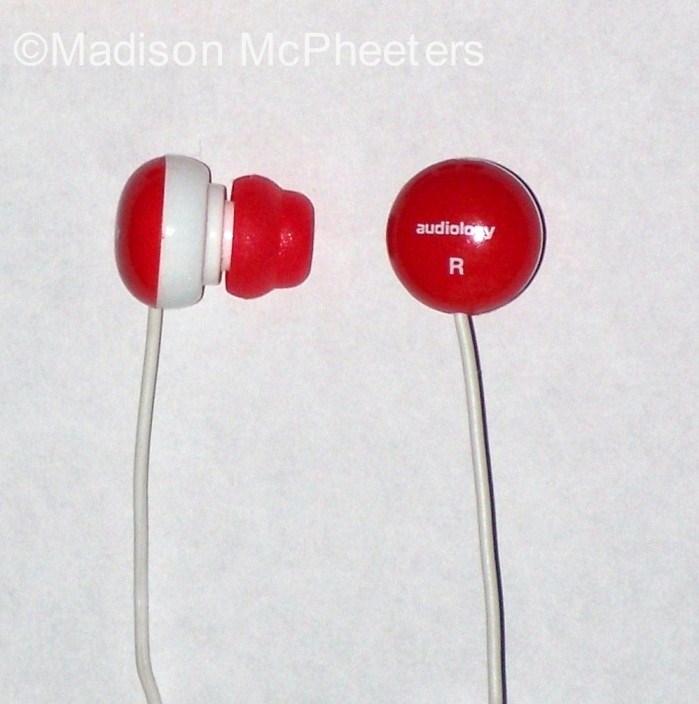
When I purchased the Audiology Magma earbuds, I knew the price was right. However, I wasn't sure what level of sound quality and practicality they would provide. Read on to learn my impressions.

First of all, The Magma has decent sound quality. I'm no audiophile, but they are more than satisfactory for me. The only negative factor I could identify would be the soft bass. I think the bass should be bolder. If you are looking for analytical-quality sound, I think you should look for a higher-end product.

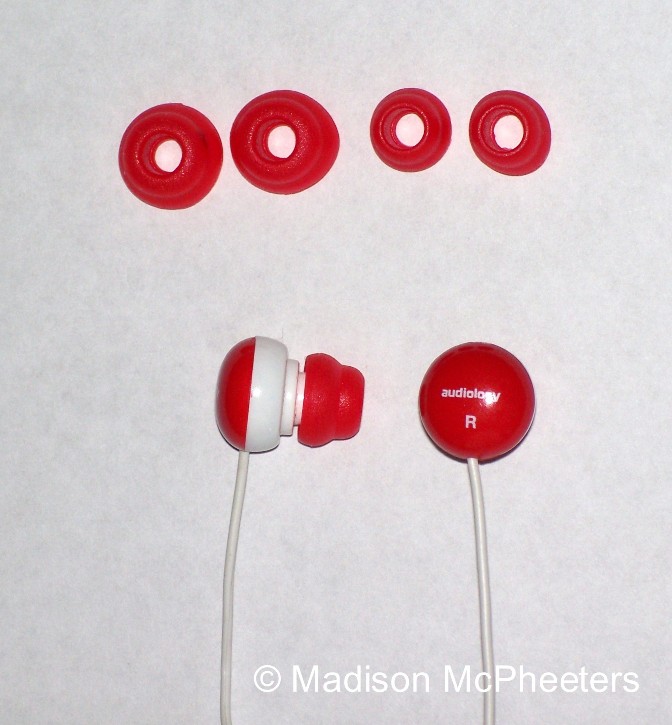
The Magma earbuds with the two sets of inserts 

The Magma comes with three types of ear bud inserts: small, medium, and large. The medium sized insert, which came pre-installed on the Magma, worked great for me. For an experiment, I changed an insert and found that it was very easy to get on and off. If you have the correctly sized insert installed, these earbuds stay on well. I didn't hear a lot of outside noise, but I could still understand nearby conversation. Because these earbuds stay on well and allow just enough outside sound to be audible, I believe they would be a good pair for jogging or exercising.

Just so you are fore-warned, the Magma has an annoying quirk. Its wires tangle up VERY easily. If I try to wind them up to put them in a pocket, they still come out tangled. It takes me less than a minute to untangle them, but it’s still annoying.

I bought the Audiology Magma earbuds on sale at Menard's for about $2. On Amazon.com, they are regularly priced at $15.57, including shipping and handling. I would not pay quite that much for this model, but I think anything less than $10 is a very reasonable price for the Magma.

In summary, if you are looking for earbuds that deliver high-end sound quality, the Audiology Magma earbuds are not for you. However, if you are looking for good fit with reasonable sound quality at a very affordable price and are willing to deal with it’s little quirk, I recommend them.

This table provides technical specifications for the Audiology Magma earbuds:
Frequency response
20-20000Hz
Impedance
16 Ohms
Sensitivity
102 dB
Max input power
50mW
Cord length
1.2m
Plug type
3.5mm
Driver units
13mm


Continue Reading... Labels: , ,


Give an OPML Of Your Favorite Blogs

0 comments

Following the footsteps of CNET Blog 100, PC Magazine too today released their own list of 100 favorite blogs. The list includes the usual suspects but if you are new to the blogging world, this is probably a good place to quickly build your reading list.
There's something surprising here - PC Magazine decided to release a Windows based installer that will add this grand list of 100 blogs right into your Internet Explorer bookmarks.
pc magazine blogs
Agree, a lot of people still use browser bookmarks to save their favorite websites but blogs are generally read and subscribed in RSS readers. PC Magazine could have released the blog list as an OPML that subscriber could import to their favorite news readers in a click.
Secondly, the PC Magazine installer will work only on Windows even though the mentioned blogs would definitely interest readers who may be on Mac and Linux.
Another surprise - Scobleizer is missing.
Continue Reading... Labels: , ,


Return to top of page Copyright © 2010 | Flash News Converted into Blogger Template by HackTutors